How to Read a Hybrid Inverter Display?
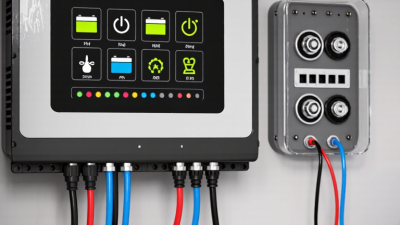
A Hybrid Inverter Display can turn a wall-mounted energy system into a readable story: where power comes from, where it is going, and what the battery is doing. Yet its icons and figures can feel cryptic at first. A sun symbol may show solar production, while arrows often indicate energy flow between panels, batteries, the home, and the grid. Small changes in these readings can reveal why the system is charging, discharging, or drawing power from another source.
Start by identifying the display’s main sections, then learn what each value means on your specific model. Common readings include solar input, battery state of charge, household consumption, grid import or export, and operating mode. Context matters. A battery percentage alone does not explain whether charging is active, and a changing power value is not necessarily a fault. Compare the display with the inverter’s manual, app, and normal household activity before drawing conclusions. Models differ. Even similar icons may represent different functions.
This guide explains how to read those indicators, recognize ordinary operating changes, and spot messages that deserve attention. It also distinguishes a warning from a simple status update, without guessing at unfamiliar codes. If a reading seems inconsistent, note the time, operating conditions, and exact message before contacting the installer or manufacturer. That small record can make troubleshooting clearer. Displays are helpful, but they are not perfect; readings may update with a delay, and one unexplained number should not drive a major system change.
Identify the Main Sections of a Hybrid Inverter Display
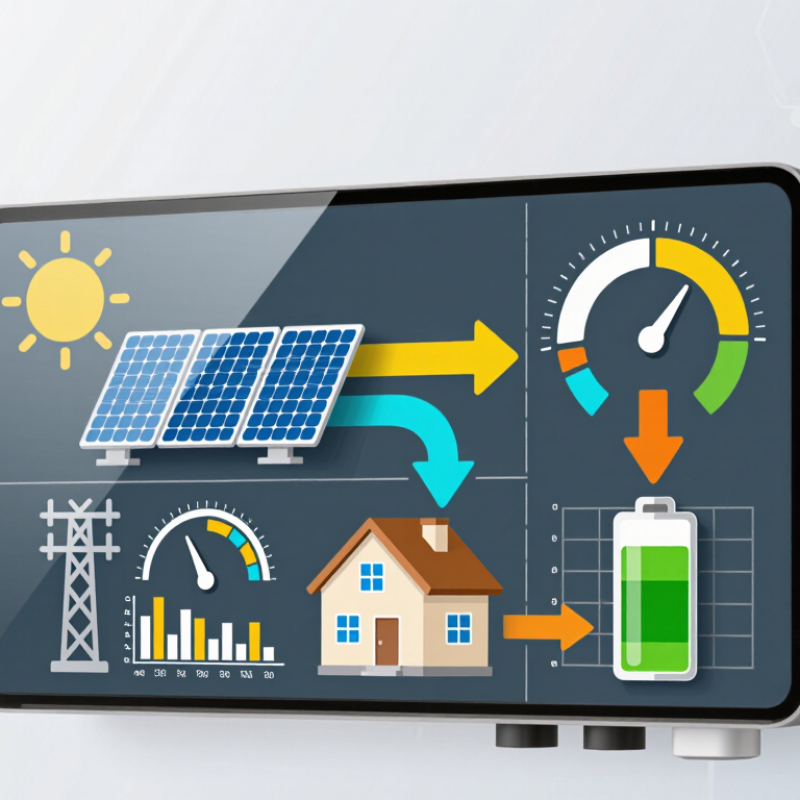
A hybrid inverter display usually groups information into a few practical sections. The status area shows whether the unit is operating, waiting, or reporting a fault. Nearby, a power-flow diagram may use arrows to show energy moving between the solar panels, the battery, the home, and the grid. Watch the direction of each arrow, not just its color. A small icon can be easy to miss.
The readings section gives live values such as solar output, household demand, battery charge, and grid import or export. Check the units: kW describes power at that moment, while kWh measures energy over time. Battery percentage is useful, but it does not show the battery’s full condition or available capacity. Numbers may change quickly when clouds pass or a large appliance starts. That flicker is normal.
Look for operating mode, warning messages, and system time in separate status or menu areas. Modes may indicate whether the system prioritizes self-use, backup, or another configured behavior. Labels are not always intuitive; even a familiar symbol can mean something different across models. If a reading seems inconsistent, compare it with the manual and check whether the display is showing live data or a delayed update. Don’t guess at an alarm. A clear photo of the screen can help a qualified installer identify the message.
Check the System Status and Operating Mode
Start with the inverter’s status line before interpreting individual numbers.
Look for whether the system is operating normally, waiting, charging, or reporting a warning. Then check the displayed PV, battery, grid, and load values. A sunny-morning reading might show solar power flowing to the house while surplus energy charges the battery.
Read the labels, not just the figures.
That matters. Similar numbers can describe very different conditions when the screen switches between input and output values.
Next, identify the operating mode, such as self-consumption, backup, or time-based operation. Mode names and symbols vary by model, so confirm their meaning in the user manual. Follow any arrows or flow diagram to see where energy is going. If the display shows battery discharge while the home load is low, check the time, settings, and recent energy use before assuming a fault. Screens can refresh slowly, and a brief mismatch is not always a problem. Still, do not ignore a persistent warning or an unexpected mode. Record the status, mode, and time, then compare them with the manual or ask a qualified installer. One reading rarely tells the whole story.
Follow Power Flow and Energy Direction
How to Read a Hybrid Inverter Display?
Follow Power Flow and Energy Direction
A hybrid inverter display is easier to understand when you follow the arrows, not just the numbers. Trace energy from the solar panels toward the home, battery, or grid. If the home uses less solar power than the panels produce, the battery may charge or energy may flow outward. When demand rises, the battery or grid may supply the shortfall. Direction matters. A minus sign can indicate export or discharge, depending on the display. Check its legend before drawing conclusions.
Tips: Compare the arrows with the labels “import,” “export,” “charge,” and “discharge.” Note whether the reading shows watts, which change moment by moment, or kilowatt-hours, which accumulate over time. A quick photo at midday and again after sunset can help reveal the pattern.
Read the display alongside what is happening in the home. A kettle switching on may cause a brief jump in grid use; that does not necessarily signal a fault. Battery percentages also need context: a low reading may reflect a reserve setting rather than a problem. Displays can update at different speeds, so the arrows and values may not match perfectly for a moment. If a flow seems reversed or stays unusual, check the manual and operating settings. It is easy to assume the screen tells the whole story. Sometimes it doesn’t.
How to Read a Hybrid Inverter Display? — Follow Power Flow and Energy Direction
| Display Example |
Typical Power Flow |
What It Means |
What to Check |
| Solar: 3.2 kW; Home: 1.1 kW; Battery: 0.9 kW charging; Grid: 1.2 kW export |
Solar → home, battery, and grid |
Solar generation is supplying the home, charging the battery, and sending surplus power to the grid. |
Confirm the battery arrow points inward and the grid arrow points outward. The displayed values approximately balance, allowing for conversion losses and rounding. |
| Solar: 0 kW; Home: 1.0 kW; Battery: 0.4 kW discharging; Grid: 0.6 kW import |
Battery and grid → home |
With no solar production, the battery and grid are both supplying the home’s demand. |
Check that the battery arrow points outward and the grid arrow points toward the inverter or home. Review the battery’s minimum state-of-charge setting if discharge stops unexpectedly. |
| Solar: 2.4 kW; Home: 1.5 kW; Battery: 0.5 kW charging; Grid: 0.4 kW export |
Solar → home, battery, and grid |
Solar production exceeds household demand, so the remaining power is split between battery charging and grid export. |
Check whether export is permitted and whether a configured export limit is affecting the displayed grid flow. |
| Solar: 1.8 kW; Home: 2.0 kW; Battery: idle; Grid: 0.2 kW import |
Solar and grid → home |
Solar is covering most of the load, while the grid supplies the shortfall. The battery may be idle because of its operating mode or charge limits. |
Review the selected operating mode, battery state of charge, and any charge or discharge schedule. |
| Solar: 0 kW; Home: 0.8 kW; Battery: 0.8 kW discharging; Grid: 0 kW |
Battery → home |
The battery is supplying the displayed household load, with no solar generation or grid exchange shown. |
Compare the battery’s state of charge over time and confirm that the display is showing real-time power rather than accumulated energy. |
| Solar: 0.5 kW; Home: 1.2 kW; Battery: 0.3 kW charging; Grid: 1.0 kW import |
Solar and grid → home and battery |
The system is importing power while charging the battery. This can occur when grid charging is enabled or when the configured charging schedule is active. |
Check grid-charge settings, time-of-use schedules, and whether the battery is intentionally charging from the grid. |
| Reading tip: Follow the arrows to identify energy direction: an arrow toward the battery usually indicates charging, an arrow away from it usually indicates discharging, and grid arrows indicate import or export. Icon conventions and displayed values vary by inverter; consult the unit’s manual. Power is measured in kW, while energy accumulated over time is measured in kWh. |
Interpret Alerts and Warning Indicators
How to Read a Hybrid Inverter Display?
Interpret Alerts and Warning Indicators
A hybrid inverter display can show normal power flow, a warning, or a fault that needs attention. Check the alert symbol alongside the battery, solar, and grid readings. A flashing battery icon with a low charge value, for example, may indicate limited stored energy rather than equipment failure. Small detail matters. Note the exact message or code before taking action.
Warnings can point to high temperature, unusual voltage, communication loss, or a battery issue. Their meanings vary by model, so use the unit’s manual to interpret the specific code. It is tempting to assume every warning means the same thing; that is an easy mistake. Record when the alert appeared and whether it returns after conditions change. A photo can help a qualified technician identify a brief message.
Do not remove covers or touch internal wiring to investigate an alert. Check only visible readings and external conditions, such as blocked ventilation around the inverter. If a serious fault persists, or you notice heat, smoke, or an unusual smell, follow the manufacturer’s safety instructions and contact a qualified professional. Displays are useful, but they do not tell the whole story.