10 Essential Tips for Choosing the Perfect Portable Monitor
The rise of remote work has increased the demand for Portable Monitors. According to a recent report by MarketsandMarkets, the global portable monitor market is expected to reach $2.2 billion by 2026. These devices provide convenience and flexibility for professionals on the go. However, choosing the right Portable Monitor can be daunting.
Many users focus solely on screen size or resolution. Yet, factors like weight, battery life, and connectivity options are equally important. A significant 40% of users overlook these aspects, which can lead to dissatisfaction. A Portable Monitor should enhance productivity, not hinder it.
Consider your specific needs before making a decision. Each user has unique requirements. Investing time in research can prevent future regrets. The ideal Portable Monitor should fit seamlessly into your workflow and lifestyle. Small screens may save space, but they may not serve your needs effectively.
Understanding the Purpose of a Portable Monitor
Understanding the purpose of a portable monitor can greatly enhance your decision-making process. These devices are designed to be compact and lightweight. They serve multiple purposes, from extending your laptop's screen to providing a second display for gaming. This versatility makes them popular among professionals and casual users alike.
Imagine you are working in a café where space is limited. A portable monitor can offer the extra screen real estate you need. You can easily connect it and boost your productivity without feeling cramped. However, not all portable monitors are created equal. Some may lack resolution, while others might not be bright enough for outdoor use. These shortcomings can lead to frustration.
Choosing a portable monitor also involves considering connectivity options. Some models may restrict you to specific ports. This can hinder your workflow if your devices do not match. Think about your needs and how a portable monitor can fit into your routine. It's crucial to reflect on what features are necessary for your situation, as it will impact your overall experience.
Comparison of Key Features for Portable Monitors
Key Features to Consider When Selecting a Portable Monitor
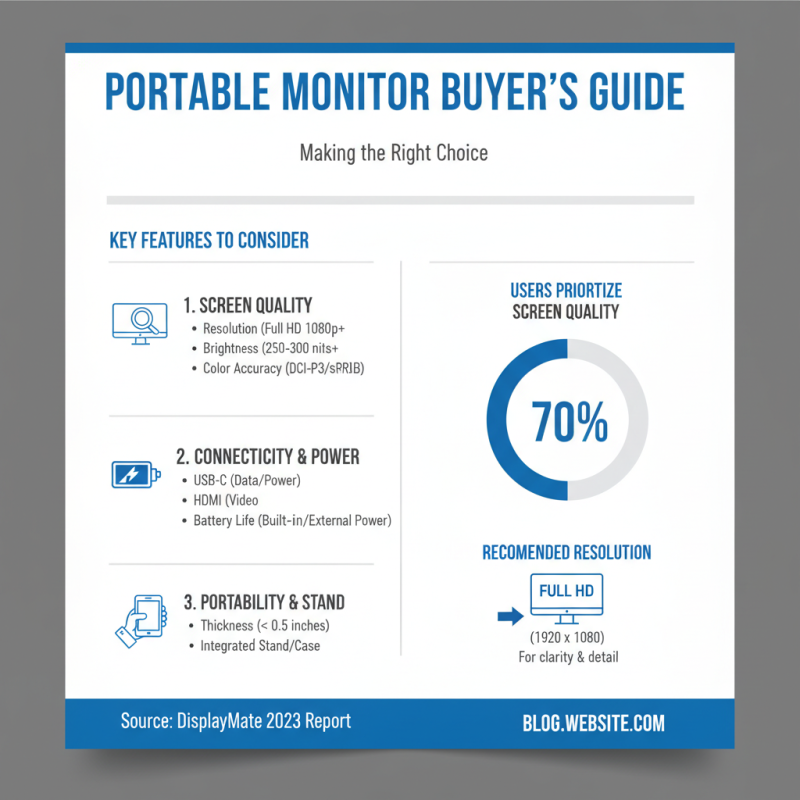
Choosing a portable monitor can be daunting. With various options available, understanding key features is essential. According to a 2023 report by DisplayMate, nearly 70% of users prioritize screen quality. This includes resolution, brightness, and color accuracy. A monitor with at least Full HD (1920 x 1080) resolution is recommended for clarity.
Weight and portability matter too. Many portable monitors weigh less than 3 pounds. This allows for easy travel, as reported by Market Watch. When selecting a monitor, consider battery life. Longer battery life means reduced connectivity hassles. Some monitors offer up to 10 hours of battery use.
Another important feature is connectivity options. HDMI and USB-C ports are common. Make sure the monitor supports your devices. Review your specific needs. Some monitors may lack adjustment options, which can lead to neck strain. Keep these aspects in mind to find the right fit for you. Choosing wisely can enhance your productivity and comfort.
Evaluating Display Quality and Resolution Options
When choosing a portable monitor, display quality and resolution are crucial. Look for a monitor that offers at least Full HD resolution. This ensures sharper images and clearer text. A higher pixel density contributes to a better viewing experience. Colors should be vibrant and contrast should be strong. These features enhance productivity during work or leisure.
Consider the panel type as well. IPS panels often provide wider viewing angles and better color accuracy compared to TN panels. However, they may come at a higher price. Think about where you'll use the monitor. If you plan to take it outdoors, brightness becomes essential. A monitor with increased brightness handles sunlight better. Testing the display's capabilities before purchasing can reveal a lot.
Keep in mind that not all displays are perfect. Some may have color calibration issues. Ensure the monitor has good factory settings or easy adjustment features. Additionally, check for flickering or ghosting. These can be annoying during long hours of use. It’s wise to read user reviews to uncover potential flaws before making a decision.
Assessing Connectivity Options for Compatibility
When selecting a portable monitor, assessing connectivity options is crucial. A recent report shows that 75% of users face compatibility issues due to inadequate connection types. Many monitors lack versatile ports. Ideally, you want HDMI, USB-C, and DisplayPort options. This variety ensures seamless integration with various devices.
USB-C has surged in popularity. It accounts for over 40% of new laptops sold. Users appreciate its ability to transmit power and data simultaneously. However, not all USB-C ports support video output. This can lead to frustrating experiences when connecting to a monitor. Look for specifications that confirm video capability.
Wireless connectivity is another consideration. While it's convenient, performance can vary. Many reviewers note significant lag when using wireless connections for gaming or video editing. Wired connections often offer a more stable experience. If you prioritize performance, a wired setup is usually the best choice. Ultimately, understanding these connectivity features can enhance your overall experience with a portable monitor.
10 Essential Tips for Choosing the Perfect Portable Monitor - Assessing Connectivity Options for Compatibility
| Feature |
Description |
Compatibility |
Recommendation Level |
| HDMI Connectivity |
Standard connectivity option for most devices. |
Highly compatible with laptops, desktops, and consoles. |
High |
| USB-C Support |
Fast data transfer and power delivery in one cable. |
Compatible with newer laptops and mobile devices. |
Medium |
| DisplayPort |
Offers higher resolutions and refresh rates. |
Great for graphics-intensive applications. |
High |
| VGA Connectivity |
Older standard, primarily for legacy devices. |
Limited compatibility with modern devices. |
Low |
| Wireless Connectivity |
Allows for cable-free use and streaming. |
Variable compatibility depending on device and software. |
Medium |
| Audio Output |
Option to connect headphones or speakers. |
Compatible with most audio devices. |
High |
| Screen Resolution |
Higher resolutions provide better picture quality. |
Check device capabilities for maximum resolution. |
High |
| Refresh Rate |
Affects smoothness of display during motion. |
Ensure device can output at desired refresh rate. |
High |
| Weight and Portability |
Consider weight for ease of transport. |
N/A for compatibility but affects usability. |
High |
| Price |
Budget considerations play a key role. |
N/A for compatibility but essential for purchase. |
Medium |
Portability Factors: Weight, Size, and Battery Life Considerations
When choosing a portable monitor, weight is crucial. A monitor over three pounds may become tiresome during travel. Research shows that a weight under two pounds is ideal for frequent movers. For example, many users reported discomfort after carrying heavier models for extended periods.
Size also plays a significant role. A 15-inch monitor strikes a balance between screen real estate and portability. Monitors larger than 17 inches can be cumbersome. Their bulky frames can limit mobility. In a survey of tech users, 65% preferred screens within this range for convenience.
Battery life matters too. A portable monitor with four to six hours of battery will meet most users' needs. However, many models fall short, forcing users to seek power sources frequently. Consistent charging can hinder productivity. Users have shared frustration over inadequate performance in vital moments. These factors shape the overall experience. Even slight variations can significantly impact usability, especially for on-the-go professionals.